Manage your mod collections in a hassle-free manner
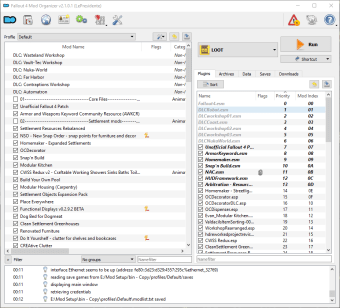
Mod Organizer 2 is a powerful modification organizer developed to support a range of 64-bit games like Fallout, Skyrim Special Edition, and 32-bit games supported by Mod Organizer’s previous version. With the Fallout Mod Organizer 2, it becomes easier to manage mod collections of any size. The tool has been designed for fans interested in experimenting with modifications.
Compared to C&C3 and Vanilla UI, this is a comprehensive modification to directly install your mods into the game. In case you want to uninstall a mod, the tool serves the purpose quickly. Mod Organizer for Fallout is ideal for testing various modifications while playing the game in real-time.
Easily organize your Fallout mods
Fallout is one of the most popular game franchises. As such, it has an active mod community dedicated to improving the game experience. Therefore, you can easily find a lot of mods for the game online. At times, it can be difficult to keep track of them or organize them properly. For this purpose, Mod Organizer 2 download is a great choice.
What are the features?
Fallout Mod Organizer 2 lets you manage a range of modifications, irrespective of their size. Mod Organizer 2 utilizes a Virtual File System (VFS), also called US VFS or User Space VFS. This tricks the game believe that all your modifications have been installed into the data folder when they’re in fact in their respective folders.
It’s worth mentioning that Mod Organizer for Fallout installs and uninstalls individual modifications quickly. Moreover, it doesn’t overwrite the game, making it easier to disable mods without interrupting gameplay. With Mod Organizer 2 download, you can also create different game profiles.
A good choice for managing your mods in one place
Mod Organizer 2 is a comprehensive video game utility tool. It helps you conveniently manage your entire modification collection for multiple games. With this software, you can experiment with a lot of mods, while installing or uninstalling them within seconds.